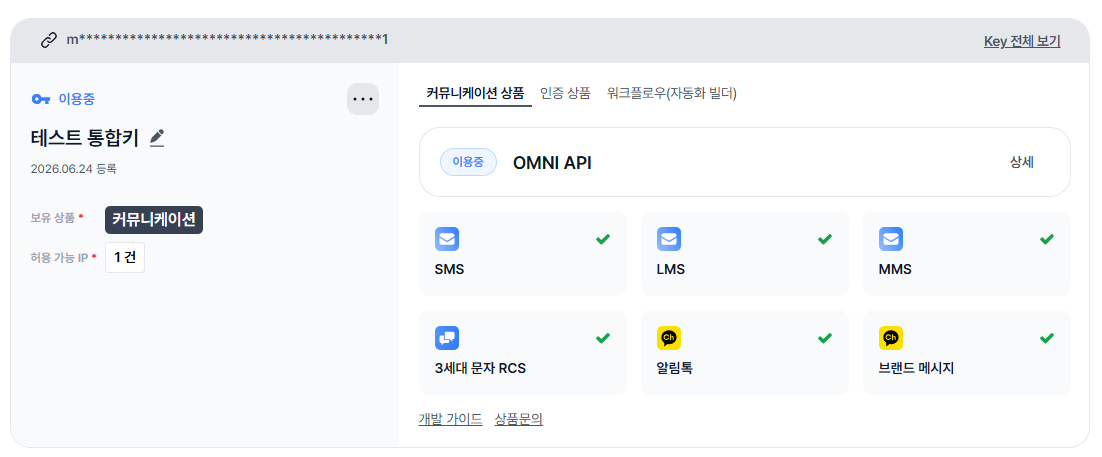
The A403 (NOT_PERMISSION) response you received is the code returned when the API key used does not have permission to call that particular API.
The /v1/center/kakao/sender (Kakao sender profile lookup) endpoint you called requires that the Kakao products (AlimTalk / Brand Message) under OMNI API be enabled on the key. Sandbox testing is also validated against the actual permissions of the API key you enter, so we’ll first need to check whether OMNI API is enabled on the key you’re currently using.
Could you check the following in the console?
Whether OMNI API shows as “In Use” (이용중) on the [Product Management] screen
Whether the SMS / LMS / MMS, RCS (3rd-gen messaging), AlimTalk, and Brand Message items each have a green check mark (enabled)
If OMNI API is “In Use” and the individual products are checked but you still get the same A403, we’ll check the key-level permission settings on our end directly. Please send the following information via a direct message (by clicking my profile) or through your sales representative:
Account ID
Sender profile key
(As a note, we recommend not posting full API key / secret values in public posts.)
We’ll get back to you quickly once we’ve checked. If you have any further questions, please don’t hesitate to reach out. Thank you
Looking at the value you shared, it appears to be a sender profile key, and it looks to be a production (PRD) key.
The sandbox runs on a separate STG (staging) environment, so a sender profile key issued for the PRD environment may not work when tested in the sandbox. The environments are isolated, which can result in an A403 even when the key itself is valid.
Could you check the following?
That you’re using the API key (and sender profile key) issued for the STG / sandbox environment when running sandbox tests
That the production-issued key is used against the production endpoint instead
If you test in the sandbox with the STG-environment key and still receive A403, please let us know — we’ll check the key-level permissions on our end.
I want to get apiKey and senderKey at sandbox to testing and develop for my system, but i cannot find apiKey, senderKey, let support me get them in sandbox. Thank you
I haven’t subscribed to any packages yet. I’ve verified my company, and now I want to integrate it into my system and use a sandbox for testing. Is it absolutely necessary to subscribe to a paid package? And where can I get the API Key and sender Key for the sandbox?
API Key
There isn’t a separate sandbox-only API key. Once an integrated key is issued in Bizgo, it takes about 1 hour to sync, after which you can use the same key for sandbox testing. So you don’t need a separate key issued specifically for the sandbox.
Sender Key
There is no separate sender key provided for the sandbox environment. Because of this, testing that requires an actual sender profile (sender key) is not possible in the sandbox.
What the sandbox is for
The sandbox is intended for testing the API request/response format — i.e., checking how the API receives requests and what responses it returns. To actually test sender profile activation (and send real messages), you’ll need to subscribe to a plan / register a paid product.
So to answer your questions directly: you can use the integrated key for the sandbox without a paid subscription to check request/response behavior, but a plan registration is required for sender-profile-level testing and real sending.
If you have any further questions, please don’t hesitate to reach out. Thank you
If OMNI API is “In Use” and the products are all checked but you still get the same A403 (NOT_PERMISSION), the issue is on the key-level permissions on our side — we’ll check it directly. Please send your Account ID and Sender profile key via DM (click my profile) or through your sales rep.
(As a note, we recommend not posting full API key / secret values in public — and rotating any value you’ve already shared.)
If you’re currently in a testing phase and have a sales representative you’ve been working with, you can reach out to them to request a plan exemption (fee waiver) for the test period, and they’ll assist you with it. We hope this helps — thank you!